
Tally Products

Best Business Management Software

Your growth Partner
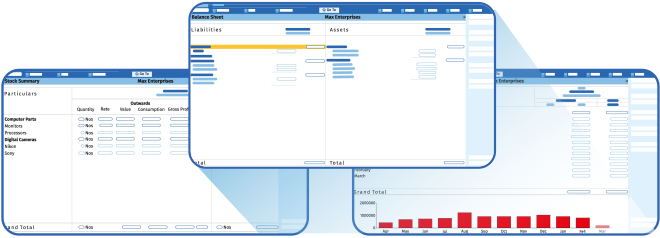
To grow your business, and to make the right business decisions, you need the right insights . With features like “Go To” and “customisable reports” in the new TallyPrime, you can discover and look at reports, slicing and dicing them the way you want. To help you in your growth journey, TallyPrime enables you to manage multiple companies and incrementally add features such as multiple go-downs, multi-currency, order process, cost centres etc. This helps you get rid of complexities, and in turn, focus on business growth.

Better control over cash flow
Quick and hassle-free bills receivables and payable management help you to get paid faster as well as managing payment timelines. Also, Tally facilitates easy and efficient stock movement, making it possible to optimize the cash flow. Besides, the insightful reports in the blink of an eye help you make confident decisions and plan the growth of your business better.

Enhanced Business Efficiency
With the speed that Tally brings, you can get things done quickly and save precious time, helping you do more for less. With TallyPrime, you can print or view the reports being in the middle of voucher entry, you can load another company being in a report without abandoning the activity you were on it, get to know the irregularities or odd details from every reports that you view and much more. No more remembering short cut keys, you have the intuitive and consistent workflow that helps you do work faster.

Tax compliance made easy
Tally's Prevention, Detection and Correction mechanism ensures that your books are always accurate - from GST returns to reconciliation, hence giving you the confidence that the returns you file are always correct!
FAQ
Got questions? We'll answer them for you!
- Download
- Install
- Start transacting in a few minutes.
Tally TSS
Tally Software Services (TSS) is a software subscription for a collection of services which add great value to your TallyPrime by giving you the latest developments in technology and statutory laws. Continuous product upgrades and Updates, connectivity driven functionalities such as online data exchange between your branches, remote access, seamless banking and payment services and much more, enhance your business performance by leaps and bounds.

Connected Services to Generate e-Way Bills Instantly
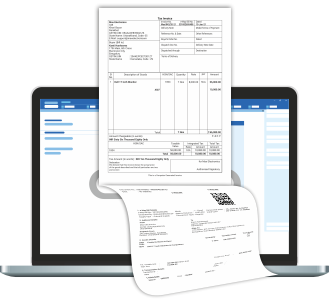
Tally's fully connected e-way bill solution is simple, seamless and reliable with zero manual work. Tally being one of the recognised ISO certified GSP (GST Suvidha Provider), TallyPrime directly integrates with the e-way portal to seamlessly generate e-way bill for you without the need to do it manually.
- Instantly generate e-way bill for a single invoice or multiple invoices
- Extend, cancel and update e-way bill details online within TallyPrime
- Flexible to generate e-way bill along with e-invoice or separately as it suits your need
- Exclusive e-way bill report giving you a complete view of transactions and the status
- Supports offline generation of e-way bills to handle the exigency cases
TallyPrime with WhatsApp
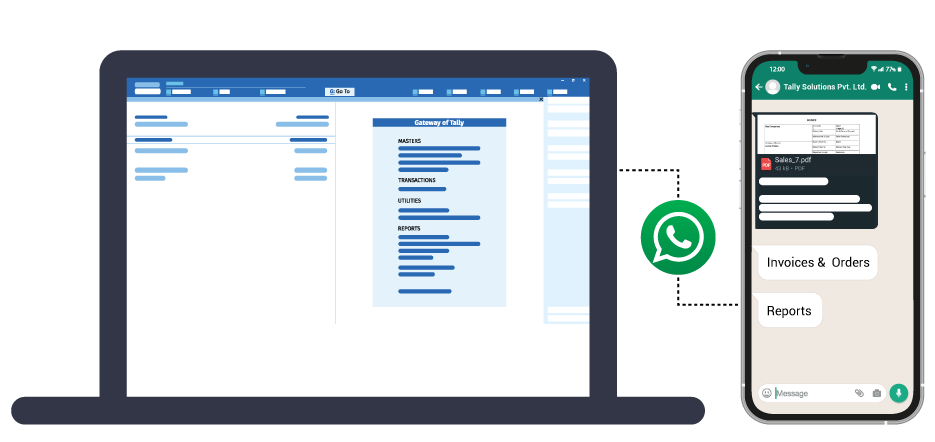
Use TallyPrime with WhatsApp for a fast and secure way to stay connected with your customers and businesses.
- Share invoices, orders, reports, and any other document directly from TallyPrime to WhatsApp
- Choose from a wide range of file formats like PDF, JPEG or Excel, for sharing
- Share invoices instantly as soon you create and send ledger reports, remainder letters, etc., in bulk for multiple parties.
- Get started right away with multiple pre-defined and approved message templates
- Personalised message templates help you to add customer's name, invoice details, and more
- A dedicated WhatsApp portal or Inbox to view and manage all incoming messages from customers.

Connected Service to Generate e-Invoice
Generating and printing e-invoice is amazingly simpler with TallyPrime's connected services. Tally being a recognized and ISO certified GSP (GST Suvidha Provider), TallyPrime directly integrates with IRP portal to seamlessly generate e-invoices.
- Auto-generate e-invoice instantly
- Print IRN and QR code automatically with no changes to the invoicing process that you follow.
- Flexibility to send individual/selective/ bulk invoices to IRP
- Generate e-invoice along with the e-way bill, wherever applicable
- e-Invoice report to get a bird's-eye view on the status (generated / pending / cancelled)
- TSS key benefits - generate e-invoice with TallyPrime
- TSS key benefits - TallyPrime's business reports

Business Reports on Any Device, Anywhere
Real-time and secure access to important business report from a web browser, on any device, anywhere.
- View your important business reports anywhere on a web browser
- Convenience of accessing your data anywhere while your data stays only with you
- Access important business reports such as Bills Receivable & Payable, Stock Summary, Sales/Purchase Register, Profit & Loss A/C, Balance Sheet etc on the go
- Helping you make the business decisions faster than before
- You can download an invoice or any report and share it on the go

Product updates
Regular product updates ensure that your TallyPrime caters to your ever-changing business requirements.
- Avail new product enhancements & major releases at frequent intervals
- Ensure compatibility with the latest technological and statutory changes

Digital Payment Request
Integrate with payment gateways and enjoy the benefits of a single system to generate and manage payment links. What's more? You can do it with UPI as well.
- Supports integration with payment gateways such as PayU and Razorpay for streamlined payments
- Add payment QR code and link on the invoices, including bulk generation for multiple invoices
- Generate payment links and share them with your customers through email and SMS
- Add payment links from different accounting reports, including the bills outstanding reports
- Easily reconcile payments recorded in books by importing the gateway statement

Banking & Payment
Experience smooth and ease of banking using Banking and Payment Services provided through TSS.
- Receive updates for all the latest cheque formats of banks available in your TallyPrime
- Automatically reconcile your books of accounts with your bank statements. It's quick, simple, accurate and stress-free. It saves your time, manpower and money
Online Data Synchronisation
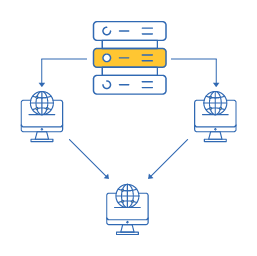
Decentralization of your books of accounts across branches is no more difficult. With TallyPrime's data synchronization, you can synchronize data across your head office and branches, factories or warehouses.
- Exchange and consolidate Data across branches at click of a button
- Greater control on the direction of data synchronizes and data to be synchronized
- Synchronize the data without needing to be 'connected to each other live' using on-demand synchronization
- Complete visibility of business through consolidated reports of Head office and Branch office(Balance Sheet, P&L, Stock report, etc.)

Remote Access
24X7 business connectivity using our Remote Access Services and manage your business from anywhere in the world.
- Get round the clock access to crucial information about your business performance irrespective of the time or location
- Manage cash flows, bank accounts, stock positions or manufacturing time-lines even when you are not in your office
- Create and modify the business transactions and other details on the go
- Provide access to Chartered Accountants and their audit clerks to audit data
FAQ
Got questions? We'll answer them for you!
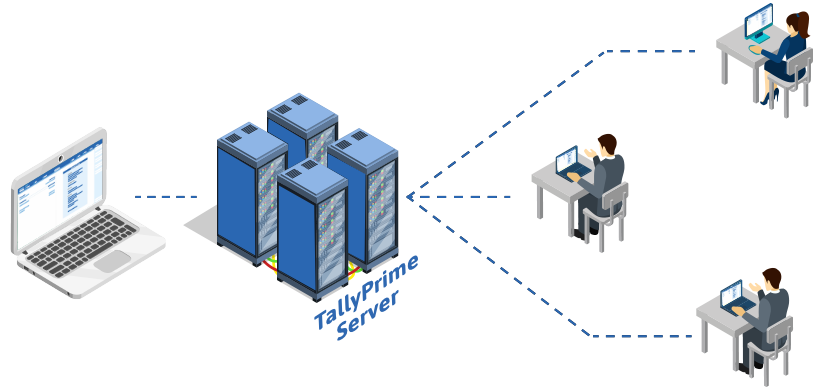
Tally Prime Server
Unleash the power of TallyPrime with a Client-Server Architecture.
TallyPrime Server offers powerful data server capabilities over the Gold license. This server-based Data Architecture unleashes greater concurrency, secured data access, and advanced monitoring capabilities. TallyPrime Server is truly an Enterprise Class product that helps fast-growing medium and large businesses improve their business efficiencies.
Features
- You are a growing business with 10+ employees performing various operations simultaneously
- A business where multiple users are connected to the same data and there is a need for an administrator to manage the data access and also monitor the user's activities.
- A business with multiple branches and head office. All the transactions of Branch office are consolidated to Head office while the local users are still operating smoothly.
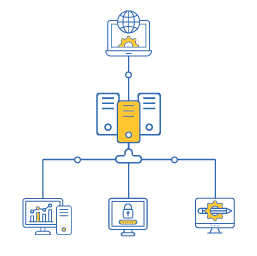
High Concurrency
Performing operations in a frictionless environment
Multiple users will be able to simultaneously load companies, save transactions, export reports,
print reports, import data, take backup and perform other data related activities without
experiencing any downtime. This will directly result in optimal utilization of man hours as the
velocity at which a task gets completed will increase. Further, the users will be able to
seamlessly work on the same data. Your Data will always be real-time, consistent, and accurate.

Secured by design
Providing controlled access to data files
When data files are managed through TallyPrime Server, the location of the data on the server is
not required. The name of the data server is sufficient to access and operate TallyPrime.
Operations over the company data like backup and restore are controlled with server level
permissions available with authorization only. This ensures better control over user's access to
data.

High Reliability
Minimizing instances of system unavailability
Continue recording transactions or viewing reports while taking backup with no compromise on
speed or access or accuracy. It also limits discrepancies at the client end to the client
systems and ensures that neither data on the server nor the operations of other users get
impacted. Thus, improves work productivity and business performance by avoiding disruption of
work and ensuring zero downtime.

Business Process Optimization
Increased Productivity & Business Performance
A comprehensive monitoring capability allows authorized users to manage user sessions, such as
who is logged in and activities in progress. Also, with the ability to track, monitor user
activities /sessions and even disconnect users, if required, it helps to optimize processes or
system usage for enhanced productivity.
Tally On Cloud
Best solution to access your TallyPrime, anytime, anywhere.

TallyPrime powered by AWS helps you to securely access TallyPrime and your business data anytime, anywhere. It's enabled by a virtual machine dedicated to your business that is made easily available via our strong network of partners. So, you get greater flexibility to collaborate with multiple users working on the same data, at the same time. Reliable | Secure | Simple | Affordable.
Features
- Complete privacy and protection of business data guaranteed
- Automatic & encrypted backup of data ensured
- Secure from Virus, malware & ransomware
- Accommodates increased data & user demands easily
- Compliant with Indian statutory laws with locally hosted business data and backup servers

Reliability
You are familiar with the trust and simplicity of Tally products, and with AWS you will find expertise in cloud platforms. TallyPrime on AWS has been worked upon by teams at Tally & AWS to make sure it works for you anytime, anywhere. To know more about how AWS ensures high availability and security of data.

Everything you need in one place
If you choose to go with this option, all you need to do is talk to your Tally partner about it. They will lead the entire engagement from requirements gathering to implementation and even offer post-sales support. You don't need to consult multiple vendors for your solution or for any concern related to it.

Platform Agnostic
The solution works across Windows, Mac, and Linux clients when accessed through a Chrome browser even when you have different systems with general configurations of either 64 bit or 32 bit across users and across office-home

Economical
TallyPrime on AWS will be available to you at very affordable price points, worked out especially for the needs of your business.

Flexibility
Not sure which usage plan works best for you? Need to add more users? Busy month? You can seamlessly upgrade or downgrade your plan whenever you like, in a matter of minutes! A fully automated process will take care of your data and billing.
FAQ
Got questions? We'll answer them for you!
- Accesss TallyPrime from anywhere
- Greater flexibility of working on the same data collaboratively with all the users
- Cost-effective solution to access TallyPrime virtually
- Minimal infrastructure/expertise required for deployment
Tally Virtual User
Tally Virtual User (TVU) along with virtualisation technologies like RDP, RDS, and so on, allow you to access your Tally.ERP 9 anywhere, anytime. So far, Tally.ERP 9 was used on standalone desktop computers or laptops, or on computers in a LAN environment. You could decide which license of the product is right for you - a single-user (Silver) or an unlimited multiuser (Gold) based on your business needs. Over the last few years with the rise of virtualisation technologies such as Windows RDP, Citrix, Windows Thin Client, cloud services, etc., the demand to access the Tally application and data using such technologies has increased. Keeping up with our commitment to bring in changes that make your life easier, and serve the growing need to access Tally.ERP 9 anytime, anywhere, we have changed our licensing policy to authorise and support the virtual usage of Tally.ERP 9. This is operated through a Tally Virtual User (TVU) pack. The change implies that if you use Windows RDP, cloud services or similar technologies to access Tally.ERP 9 virtually, you need a TVU pack.
Some Options of Technologies to Run Tally.ERP 9 Virtually
You can use your office computer or a cloud/virtual server to host your Tally.ERP 9. When the server is connected to the Internet, you can use any computer or device, on which the third party tool works, to access the desktop of your server computer. After you access the remote desktop, you can start Tally.ERP 9 as on your local desktop.
Use Your Office Computer for Tally.ERP 9
To use Tally.ERP 9 on your office computer, you need to do the following.
- Enable Remote Desktop Connection.
- Refer to Microsoft help for instructions on enabling Remote Desktop access for the version of Windows you are using. Visit their website for support
- If you have bought Tally.ERP 9 newly, or you are changing your computer, install Tally.ERP 9 and activate the license.
- Ensure that your computer is connected to the Internet.
- You can access Tally.ERP 9 on the office computer using a remote desktop tool from anywhere.
Use A Cloud Server for Tally.ERP 9
To use Tally.ERP 9 on a cloud server, you need to do the following.
You can access Tally.ERP 9 on the cloud server using a remote desktop tool from anywhere.
- Contact your cloud service provider for the required server setup.
- Install Tally.ERP 9 and activate the license.
Access Tally.ERP 9 Using Remote Desktop
To use Tally.ERP 9 on the server, you need to do the following.
- On any computer or device, run the remote desktop tool.
There are various Remote Desktop tools like Windows RDP, Citrix, Windows Thin Client, and so on. Refer to the instructions provided by the vendor of the tool for steps to use Remote Desktop. - Connect to the server where you have installed Tally.ERP 9.
If your Tally.ERP 9 is running on the server, you can access your Tally company. Otherwise, start Tally.ERP 9 to access your Tally company.
Tips to Configure Tally.ERP 9 for Virtual Usage
To set up an online server computer for Tally.ERP 9, contact your Tally Partner, or any hardware vendor or cloud solution provider. You can evaluate the solutions of various service providers and choose the one which addresses your business needs. Once the server computer is ready, to enjoy Tally Virtual User (TVU) pack you need a valid Tally.ERP 9 license on the server. When you want to use Tally.ERP 9, from any computer or any device (if your third party service supports remote connection), connect to the server using the identified third party remote desktop tool. On the client computer, you do not need Tally.ERP 9.
Choosing hardware & software:
You need to choose your hardware and software setup
based on your business needs, and the facilities that different remote desktop tools
provide. Data security, time & duration of service availability, number of simultaneous
desktop sessions allowed, and so on are the other factors involved. Discuss these with your
service provider, and finalise the setup. Your Tally.ERP 9 data is always on the
online/remote server you are setting up. Therefore, discuss the details of data security,
including backup facilities, with your service provider.
Access control in Tally.ERP 9:
There is no change in the security options provided
in Tally.ERP 9. As in the case of using Tally.ERP 9 on your desktop, you can create users
and allow access based on your requirements. Whenever a user connects to your company, the
user can access the features for which you have allowed access. For example, if your
employee is at a client's place and wants to check receivables or record receipts, it can be
done. However, the employee will not view your financial reports unless you have given
permission.
Virtual Use of Tally.ERP 9
After you set up Tally to be accessed in a virtualised environment, you can do the following.
Access Data from Anywhere:
When you are away from your office, you can use any
computer or device, on which the third party tool works, to access the desktop of your
server computer. Then you can use Tally.ERP 9 as if you are using on a local desktop, to
check your business status and record any transaction. If you need to work on your Tally.ERP
9 data from home (post office hours), you do not need to carry the data backup and restore
it on the computer at home. When using Tally on a virtualised environment you are working on
the same data set which is located at your office/cloud. You can also print vouchers and
reports, based on the printer settings configured by your service provider.
Audit Accounts:
You can allow your auditor to do verification of your books using
remote desktop. For this, you just need to allow access to your server. Like you or your
employees logging in to the company, the auditor also can log in and do the work. There is
no need to have a separate data set - the auditor can work on the same data set.
Reach out to us
Whether you have questions about Tally, need technical assistance, our team is ready to help. Reach out to us through the form below. We look forward to hearing from you and helping you unlock new possibilities with our cutting-edge technology.