
Salesforce CRM to TallyPrime Integration
A custom Tally module that securely fetches customers, stock items and transactions from Salesforce, lets the distributor review them as optional vouchers, and posts them to TallyPrime only after confirmation.
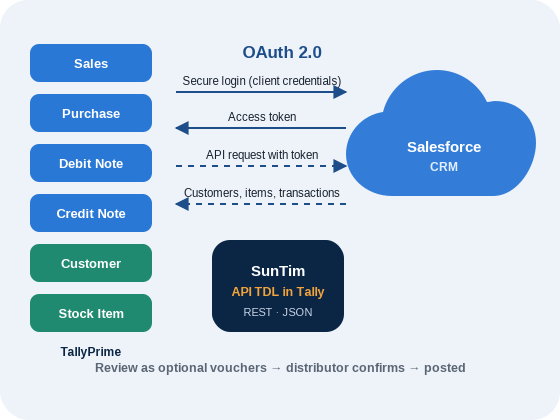
Sales happen in Salesforce. Books are kept in Tally.
When orders and customers live in Salesforce, someone has to re-type them into Tally, and distributors cannot easily check what is being posted in their books. Our Salesforce Tally integration is a customised TallyPrime module, written in TDL, that talks to Salesforce through its secure REST API and brings the data into Tally with a review step built in.
- Secure Salesforce API calls with OAuth 2.0
- Customers and stock items created as Tally masters
- Sales, purchase, credit note and debit note sync
- Customer, vendor and stock item mapping via Excel
- Optional vouchers for review before posting
- Distributor confirmation, then inventory and ledgers update
Delivered as a project
Built and delivered for Tata Consumer Products Limited (TCPL). Design, development, testing, documentation and training.
What you get
Custom Tally module
A TDL module with Master Sync, Transaction Sync, mapping and confirmation menus inside TallyPrime.
Control before posting
Every transaction is reviewed as an optional voucher and confirmed by the distributor before it affects the books.
Documentation and training
A user guide for the accounts team and distributors, plus hands-on training at go-live.
Delivered for Tata Consumer Products Limited (TCPL): a Salesforce CRM to TallyPrime module where distributors receive Salesforce transactions in Tally as optional vouchers, confirm them, and post them to their books.
From Salesforce to posted vouchers in 6 steps
Nothing touches your books until the distributor has reviewed and confirmed it.
- Connect securelyOur API TDL logs in to Salesforce with OAuth 2.0 and receives an access token.
- Fetch from SalesforceCustomers, stock items, sales, purchases, credit notes and debit notes are pulled through secure API calls.
- Map with ExcelLedgers and stock items are exported to Excel, Salesforce codes are added, and the file is imported back into Tally.
- Review as optionalFetched transactions arrive in Tally as optional vouchers, so they do not change ledgers or stock yet.
- Distributor confirmsThe distributor checks each transaction and confirms it before anything is posted.
- Posted in TallyConfirmed vouchers become regular vouchers and update inventory and ledger balances.
An integration menu built into Tally
Your team works from the Gateway of Tally. No separate software to learn. This is the menu we delivered for TCPL.
- Token – secure login to Salesforce, then the import menu opens
- API Import – ledgers, stock items, sales, purchases, credit notes and debit notes, by date range
- Mapping – choose which Tally voucher types and ledgers each Salesforce transaction uses
- Excel Export & Import – export ledgers and stock items, add the Salesforce codes, import them back
Total Ledger : 3802
Imported Ledger : 3802
Missing Ledger : 0
Press any key to continueMenu and status screens recreated from the TCPL user guide.
Real volumes from a single import run
Every run ends with a status screen: how many records came from Salesforce, how many were created in Tally, and how many are missing.
Go-live in four steps
- Load the TDLAdd the integration TDL in TallyPrime under Help → TDLs & AddOns, then enable the API integration module and enter the API details.
- Match the codesExport ledgers and stock items to Excel, enter the Salesforce customer code in the Alias column and the product code in Part No, then import the file back.
- Map vouchers and ledgersPick the Tally voucher types, sales and purchase ledgers, and GST ledgers that each transaction should use.
- Import by date rangeLog in, choose a date range and accept. Masters first, then sales, purchases, credit notes and debit notes.
Clear messages when something is missing
| Tally shows | What to do |
|---|---|
| A unit such as "PAC" does not exist | Create that unit in Tally and import again |
| Ledgers missing, check log | Import ledgers first, then the sales again |
| Missing vouchers | Open the Log_Sales, Log_Purchase or Log_Ledger file in the Tally folder |
| Too many records to load | Import a shorter date range, such as 5 to 7 days |
Needs: TallyPrime 4.1 or later, Windows 8 or later, the company open in Tally, and an internet connection.
Frequently asked questions
Can TallyPrime connect to Salesforce directly?
Yes. We build a customised TDL module that calls the Salesforce REST API over HTTPS, using OAuth 2.0 for secure login, and reads the response as JSON inside TallyPrime.
Which data can be synced from Salesforce to Tally?
Customers, stock items, sales transactions, purchase transactions, credit notes and debit notes. The exact Salesforce objects and fields are agreed with you during design.
Will Salesforce data change my books immediately?
No. Fetched transactions arrive as optional vouchers, which do not affect ledgers or stock. They are posted only after the distributor confirms them.
How are Salesforce customers and products matched to Tally?
Through Excel. You export ledgers and stock items from Tally, enter the Salesforce customer code in the Alias column and the product code in the Part No column, and import the file back.
Have you built a Salesforce to Tally integration before?
Yes. We built and delivered this Salesforce CRM to TallyPrime module for Tata Consumer Products Limited (TCPL) and its distributors.
What do I need to run it?
TallyPrime 4.1 or later on Windows 8 or later, with the company open in Tally and an internet connection.
What happens if a record fails to import?
The status screen shows how many records are missing, and a log file in the Tally folder lists each one with the reason, such as a missing ledger or unit of measure.
Do you provide documentation and training?
Yes. We provide a user guide and training for your accounts team and distributors.
Get a free Tally integration demo
Tell us which DMS, ERP or Tally product you need. We'll call you back the same working day.